Labelling
Instructions for Labelling
Important: In Roboflow do not add any labelled signs to the dataset on your own! Whoever trains the Neural Network has to check the labels first. When your labels are fine, they will be added to the dataset.
Important: The bounding boxes (bb) must not be too large or too small. The sign should be in the interior of the bb, but the bb must not be too large! The bb should be a little bit larger than the sign itself. The bb quality will have a huge impact on the detection performance! Please, label carefully.
In particular, follow these guidelines:
- do not label a traffic sign, if
- it is far away in background (not more than ~3 meter; but if it is clearly visible despite the huge distance, label it)
- it is very small
- it is strongly rotated to the side, i.e. "edge-on" view (thus, hardly visible)
- If you are not sure about an image, mark the image as null (there is a "mark null" button at the bottom right of the page)
- If there is clearly nothing in the image, delete the image
- use the shortcut keys !!! This usually saves a lot of time. (Note for German keyboard layout users: The shortcut keys are specified for an English keyboard layout. So, switch to an English layout before using the shortcuts.)
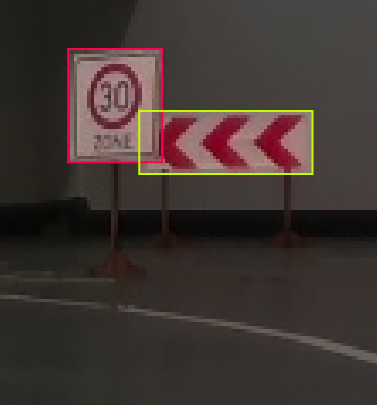
- If a sign is occluded, include the occluded part of the sign in the bounding box! If more than ~50% of its area is occluded, do not label it. See the example labels below
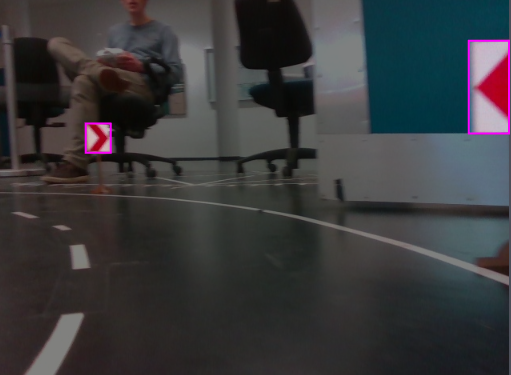
- If a sign is partially cut off simply label the visible part.
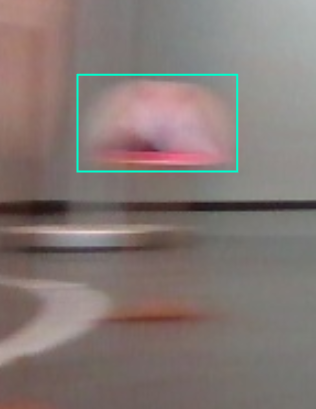
- if a traffic sign is blurry, unclear or doubled
- if the sign is unambiguously visible, label it
- if the sign is so blurry that it is not visible, do not label it
- if all signs in the image are too blurry, mark the image as null
Doubled traffic sign:
- there are two special object classes for
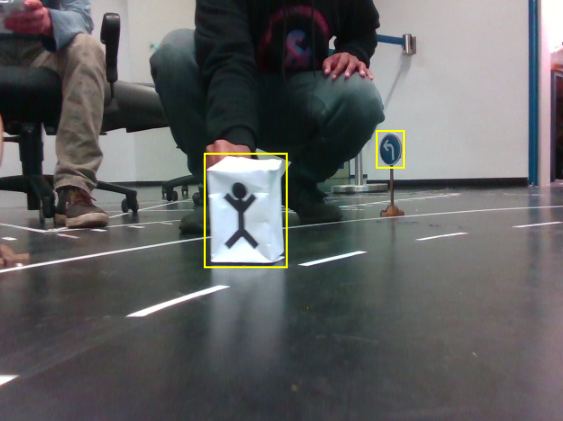
- pedestrians (class number: 54)
- obstacles/"white boxes" (class number: 55)
Pedestrian:
Label Map
Front View Network
- Signs relevant for each competition:
- For the Carolo Cup only the signs 0 to 55 are relevant.
- For the "FIRA Challenge - Autonomous Cars" only the signs 14, 70 to 74 are relevant (see rules).
- Signs 0 to 42 follow the GTSDB class naming convention.
- For convenience the sign numbers that are not relevant for labeling are not included in the list below. You can find the missing sign numbers in the list further down at the bottom of this page.
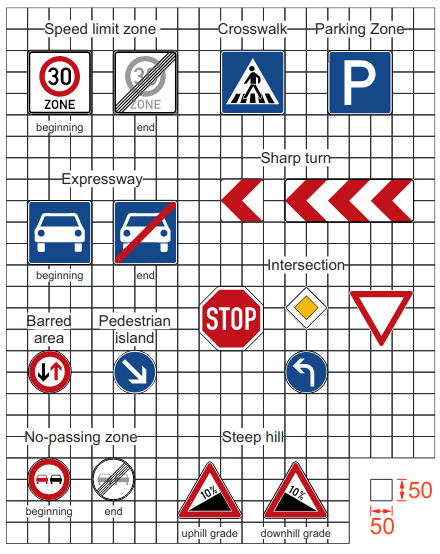
- You can find a picture of each sign below.
Sign numbers that are relevant for front-view image labelling:
| check | label | traffic sign |
|---|---|---|
| ❌ | 0 | speed limit 20 |
| ✅ | 1 | speed limit 30 |
| ✅ | 9 | no overtaking (no-passing zone) |
| ✅ | 12 | priority road |
| ✅ | 13 | give way (yield) |
| ✅ | 14 | stop |
| ✅ | 33 | go right |
| ✅ | 34 | go left |
| ❌ | 35 | go straight |
| ❌ | 38 | keep right (pedestrian island) |
| ❌ | 39 | keep left |
| ✅ | 41 | restriction ends (overtaking, no-passing zone) |
| ❌ | 43 | restriction ends 20 |
| ✅ | 44 | restriction ends 30 |
| ✅ | 45 | steep hill (uphill grade) |
| ✅ | 46 | steep hill (downhill grade) |
| ✅ | 47 | barred area |
| ✅ | 48 | crosswalk |
| ✅ | 49 | parking zone |
| ✅ | 50 | expressway (beginning) |
| ✅ | 51 | expressway (end) |
| ✅ | 52 | sharp turn (long sign version) |
| ✅ | 53 | sharp turn (short sign version) |
| ✅ | 54 | pedestrian (white box with stick figure) |
| ✅ | 55 | obstacle (white box) |
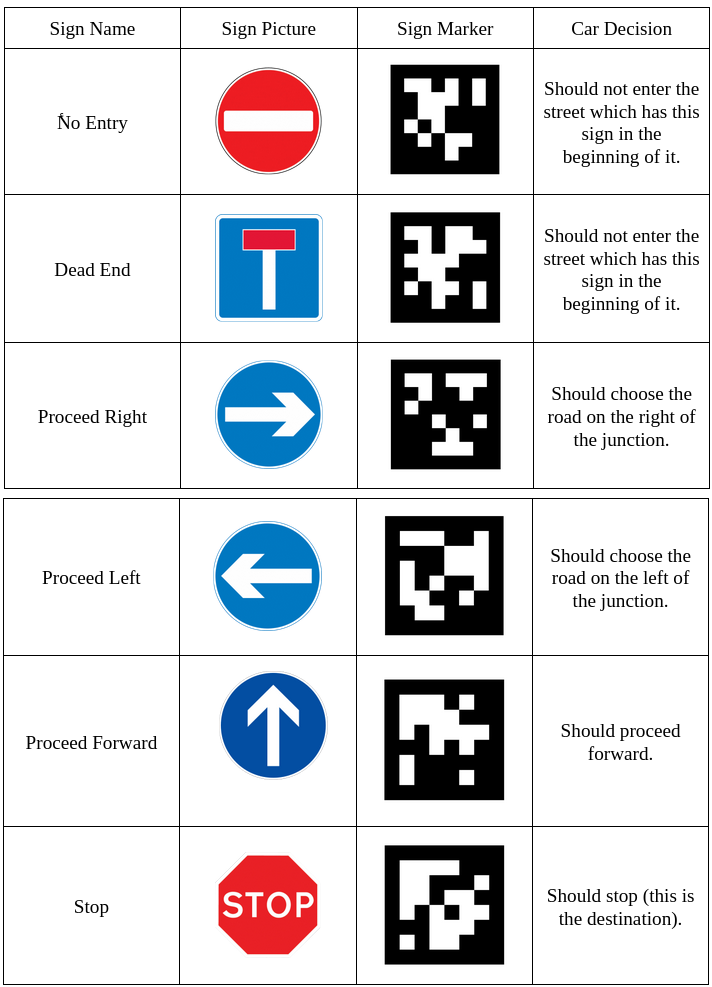
| ✅ | 70 | no entry |
| ✅ | 71 | dead end |
| ✅ | 72 | proceed right |
| ✅ | 73 | proceed left |
| ✅ | 74 | proceed forward |
Top View Network
TODO (Please, don't label these in the front-view images!)
The following objects will be detected in the top-view image (bird's-eye view image) because detecting them in the front-view image is more difficult for the deep neural network (as the Team Galaxis 2018 noticed).
| label | traffic sign |
|---|---|
| 56 | floor marking crosswalk |
| 57 | floor marking startline # please, read the startline guidelines above |
| 58 | floor marking stopline (solid) # please, read the stopline guidelines above |
| 59 | floor marking stopline (dashed, "Give-Way Line") # please, read the stopline guidelines above |
| 60 | floor marking go right |
| 61 | floor marking go left |
| 62 | floor marking no parking zone |
| 63 | floor marking speed limit 20 (beginning) |
| 64 | floor marking speed limit 30 (beginning) |
| 65 | floor marking barred area # watch the .gif above first |
| 66 | floor marking pedestrian island # please, read the pedestrian island guidelines above |
| 67 | floor marking crosswalk without lines # at pedestrian islands |
| 68 | floor marking speed limit 20 (end) |
| 69 | floor marking speed limit 30 (end) |
Complete List of Signs
0:  speed limit 20
1:  speed limit 30
2:  speed limit 50
3:  speed limit 60
4:  speed limit 70
5:  speed limit 80
6:  restriction ends 80
7:  speed limit 100
8:  speed limit 120
9:  no overtaking
10: no overtaking (trucks)
11: priority at next intersection
12: priority road
13: give way (yield)
14: stop
15: no traffic both ways
16: no trucks
17: no entry
18: danger
19: bend left
20: bend right
21: bend
22: uneven road
23: slippery road
24: road narrows
25: construction
26: traffic signal
27: pedestrian crossing
28: school crossing
29: bicycle crossing
30: snow
31: animals
32: restriction ends
33: go right
34: go left
35: go straight
36: go right or straight
37: go left or straight
38: keep right (pedestrian island)
39: keep left
40: roundabout
41: restriction ends (overtaking)
42: restriction ends (overtaking (trucks))
43: restriction ends 20
44: restriction ends 30
45: steep hill (uphill grade)
46: steep hill (downhill grade)
47: barred area
48: crosswalk
49: parking zone
50: expressway (beginning)
51: expressway (end)
52: sharp turn (long sign version)
53: sharp turn (short sign version)
54: pedestrian (white box with stick figure)
55: obstacle (white box)