carolo-cup
Software Architecture
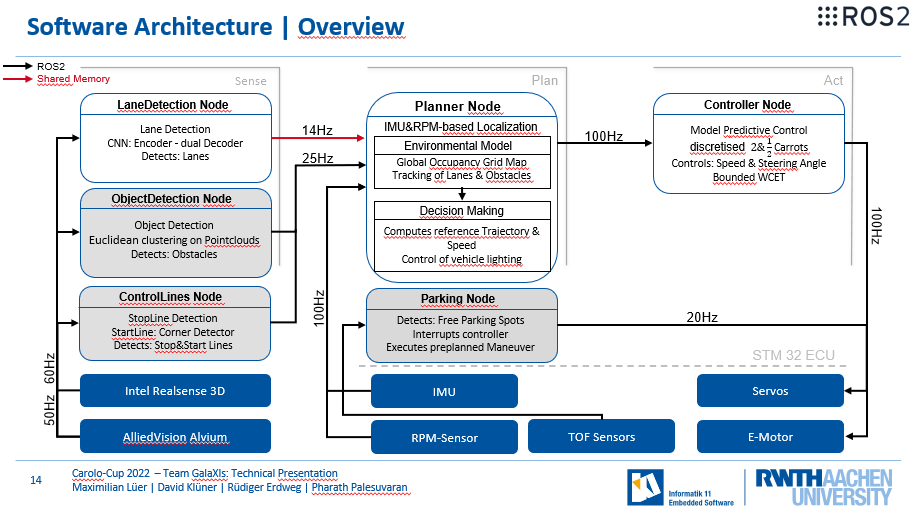
This slide contains an overview over all nodes in our vehicle.
The nodes can be roughly divided using the "sense-plan-act" paradigm, where the sense nodes are responsible for perceiving the environment, the planning nodes plan our reference trajectory and parking maneuvers and our act node, turns the reference trajectory into a driven path.
Not all nodes are active all the time, the grey marked nodes are for example not active in certain disciplines during the competition and this allows us to save the resources that these nodes might consume.
Folderstructure
.
├── docs      # Documentations and third-party documentation tool configuration files
├── messages  # ROS2 GalaXIs custom messages
├── nodes     # GalaXIs ROS2 nodes (Autopilot, Controller Node, ...)
├── scripts   # Useful scripts (start development environment, clang format, ...)
├── simulation_adapter_messages # ROS2 custom messages for simulation integration
├── test      # Unit tests (disabled)
├── tools     # Useful self-implemented programs for Map Plotting, ...
├── utilities # GalaXIs Library supporting the nodes
├── ...
└── README.md # This README
Documentation
The current doxygen documentation of our C++ code can be found here.
Further useful docs
- ROS2 Documentation: https://docs.ros.org/en/eloquent/
- ROS2 RCLCPP Eloquent: https://docs.ros2.org/eloquent/api/rclcpp/classrclcpp_1_1Node.html
Marvelmind GPS
- Non Invese Architecture vs Inverse A.
- we use non inverse
- navigation system manual
Motor Parameter Identification
WICHTIG!! Niemals Kabel abstecken solange die Batterie angeschlossen ist, dies kann dazu führen dass die FOC Einstellungen verloren gehen. Sollte dies passieren die folgenden Schritte ausführen!
- Motor muss im Leerlauf sein -> Karre aufbocken
- Batterie verbinden
- Motorcontroller mit PC verbinden -> Micro-USB auf USB-Kabel -> VESC Tool starten
- In der Seitenleiste unter "Motor Settings" General öffnen
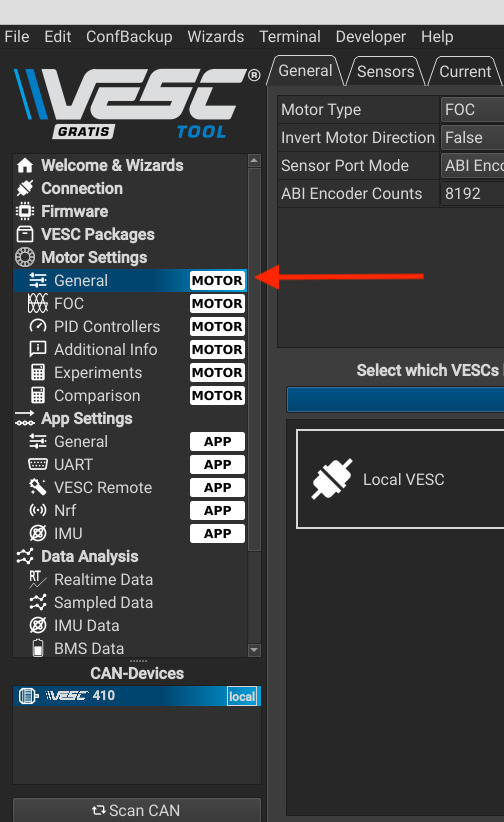
- Read Motor configuration
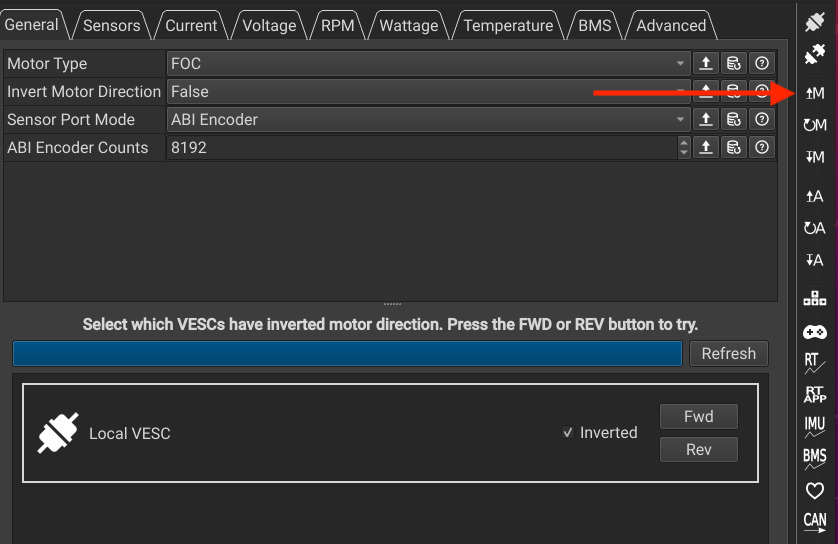
- Fahrtrichtungen überprüfen (mit der Fernbedienung) ggf. invertieren
- Motor Type -> FOC
- Sensor Port Mode -> ABI (A,B, Index Pulse) Encoder
- Write Motor Configuration
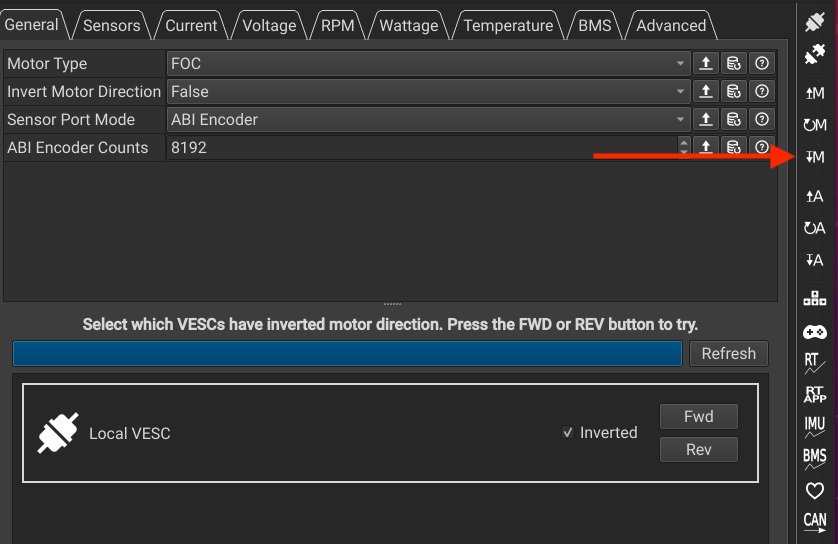
- In der Seitenleiste unter "Motor Settings" FOC öffnen
- Sensor Mode -> Encoder
- Im Tab Encoder unten bei Detect Encoder 1,00A einstellen und Start detection ausführen
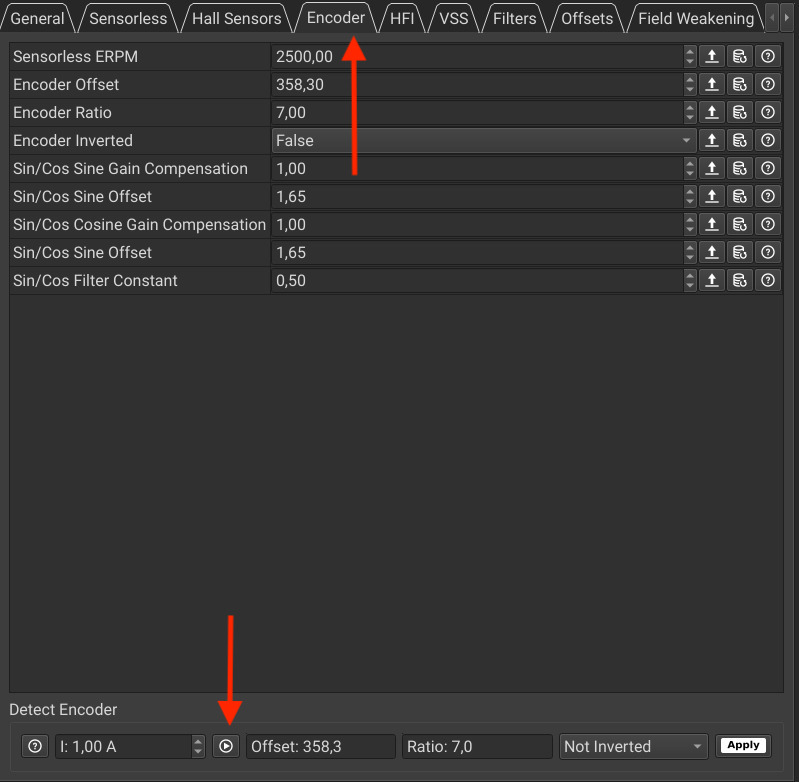
- Ratio muss 7 sein -> 14 poliger Motor -> 7 Polpaare
- dann auf "Apply" klicken -> setzt die neuen Einstellungen
- Im Tab General:
- RL Button klicken (-> Misst Widerstand und Induktivität)
- R und L sollten grün werden
- wenn weiterhin rot I um 0,5A positiv oder negativ anpassen bis grün
- Lamda Button klicken (Misst Flux Linkage)
- Lamda sollte grün werden
- wenn weiterhin rot Alpha um +500 erhöhen und erneut messen
- wenn alle Parameter grün sind (bis auf Lq-Ld, ich weiß nicht genau was das sein soll, vielleicht bekomme ich das noch raus) auf Apply klicken
- Write Motor Configuration
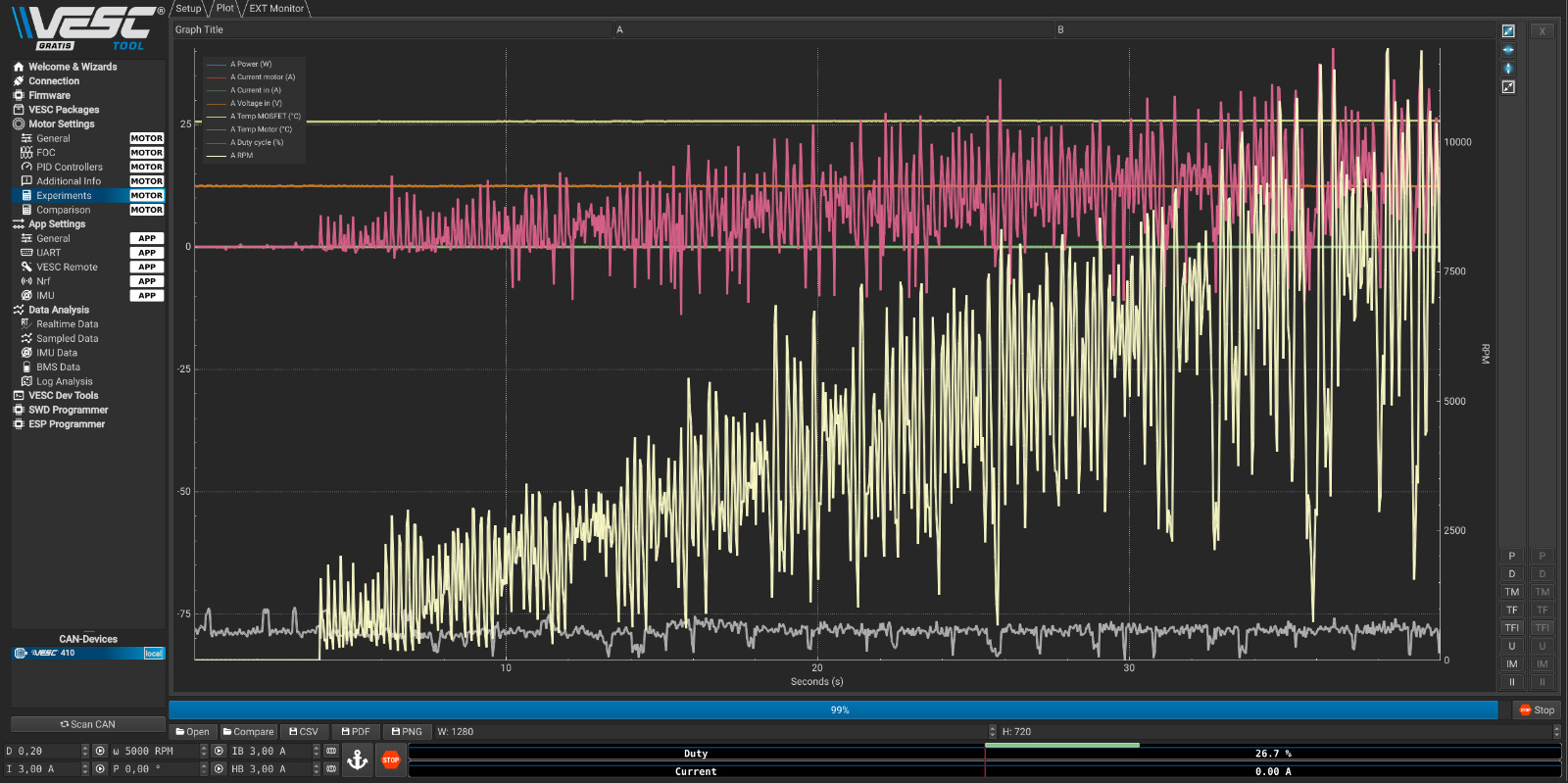
- Jetzt könnte man über den Punkt Experiments einige Werte testen dabei kann man sich Ergebnisse Plotten lassen hier der Graph für die aktuellen Einstellungen:
- In der Seitenleiste unter "App Settings" General öffnen
- APP to use sollte UART sein
- In der Seitenleiste unter "App Settings" UART öffnen
- Baudrate sollte 115200 sein
- Write App Configuration (unterhalb von Write Motor Configuration)
- Karre Auswerfen über den "Disconnect" Button oberhalb von "Read Motor Confiduration" danach Kabelverbindung mit PC trennen
Jetson AGX Xavier
NVIDIA Linux Tegra
STM32
Car
- 18 Zähne kleines Ritzel
- 33 Zähne Achsritzel
- 38 Zähne große Riemenscheibe (vermutl.)
- 20 Zähne kleine Riemenscheibe (vermutl.)
- Übersetzung Vges= 0.0595*Nmotor
ROS 2
- Logging
- Features
- ROS 1 Publishing/Subscribing to Images (only if needed)
- ROS specific Namespace prefix
- Intel ROS2 Projects Currently this is not an option, the neural network should do this stuff
- cmake apparently has to be compiled with openssl, or else there will be failures with colcon build refer to this link
- Lining & Testing
- Python Launch Files and managed lifecycle nodes
- Create a node in the following way:
ros2 pkg create --maintainer-name {your-name} --maintainer-email {your-email} --node-name {node-name} --description "{description}" --build-type ament_cmake --dependencies rclcpp utilities builtin_interfaces std_msgs messages --package_format 3 galaxis_{node-name}_pkg - Send custom message from terminal example:
ros2 topic pub -1 /galaxis/qrcodedetection/state messages/msg/QRCodeDetect '{detected: false}'
ROS2 Buildtool
SSH/VNC
ssh -p 8001 galaxis@137.226.8.100- Klick here for AGX
systemctl start vncserverto start the vnc servervncviewer -quality 5 -encodings "copyrect tight hextile zlib corre rre raw" -compresslevel 5 137.226.8.100:9002with passwordi********
SSH/RQT
ssh <ip> -XYC -c aes128-ctr
Git Stuff
Jetson TX2
- TX2 flashen:
- boot TX2, press&hold recovery button, press reset, release recovery button after 2 seconds
- apply firmware patch from Auvidea in linux_for_tegra folder
- flash jetson with sdkmanager (Jetpack 4.2)
- setup ubuntu system via monitor/mouse/keyboard AND setup WLAN/LAN
- when on loginscreen go back to sdkmanager
- change IP address to one of the IP addresses of WLAN/LAN from jetson
- let sdkmanager flash/install the software
- Create a backup image
- ===============OLD==============
- AUVIDEA Board Dreckscheiße
- Installations Scheiße FAQ
- Jetson Download Center
- NVIDIA CUDA Architecture for Jetson TX2
- Linux Tegra
- Nvidia Tensorflow for jetson
update time on ubuntu system
sudo date -s "$(wget -qSO- --max-redirect=0 google.com 2>&1 | grep Date: | cut -d' ' -f5-8)Z"- from update time & date from internet
- simply change ntp server settings to ntp1.rwth-aachen.de and ntp2.rwth-aachen.de
Format Code
Automatically
$ ./scripts/clang-format.sh /path/to/dir/to/format
Manually
- install clang-format (>=9.0.0) and check if .clang-format file is in root folder of this git repo
- to format your code run
clang-format -i filename.xyz
RealSense
- Filter application order:
There are no software-imposed constrains that mandate the order in which the filters shall be applied- Order used by realsense library/demos: ```Depth Frame >> Decimation Filter
Depth2Disparity Transform** -> Spatial Filter >> Temporal Filter >> Disparity2Depth Transform** >> Hole Filling Filter >> Filtered Depth```
- Order used by realsense library/demos: ```Depth Frame >> Decimation Filter
KITCAR GAZEBO SIMULATION
- Clone galaxis-simulation Repo
- Build and Start Simulation and Bridge (See README.md of galaxis-simulation repo)
- Start SimulationAdapter
- Start RemoteControl (have fun)