Onboarding
Welcome to the Team GalaXIs Onboarding! We have a few challenges for you, which help to get an overview about our software and its architecture. The challenges are (Linux/Ubuntu/Manjaro required):
-
- Setup the three docker environments: Development Runtime Environment, Simulation (Main) Environment, Simulation Bridge Environment (have a look at the Setup section)
-
- Implement an own basic Controller (
nodes/OnboardingController/ControllerNode- TODO section)
- Implement an own basic Controller (
Before you start, make yourself familiar with the Software Architecture and the Folderstructure (sections below).
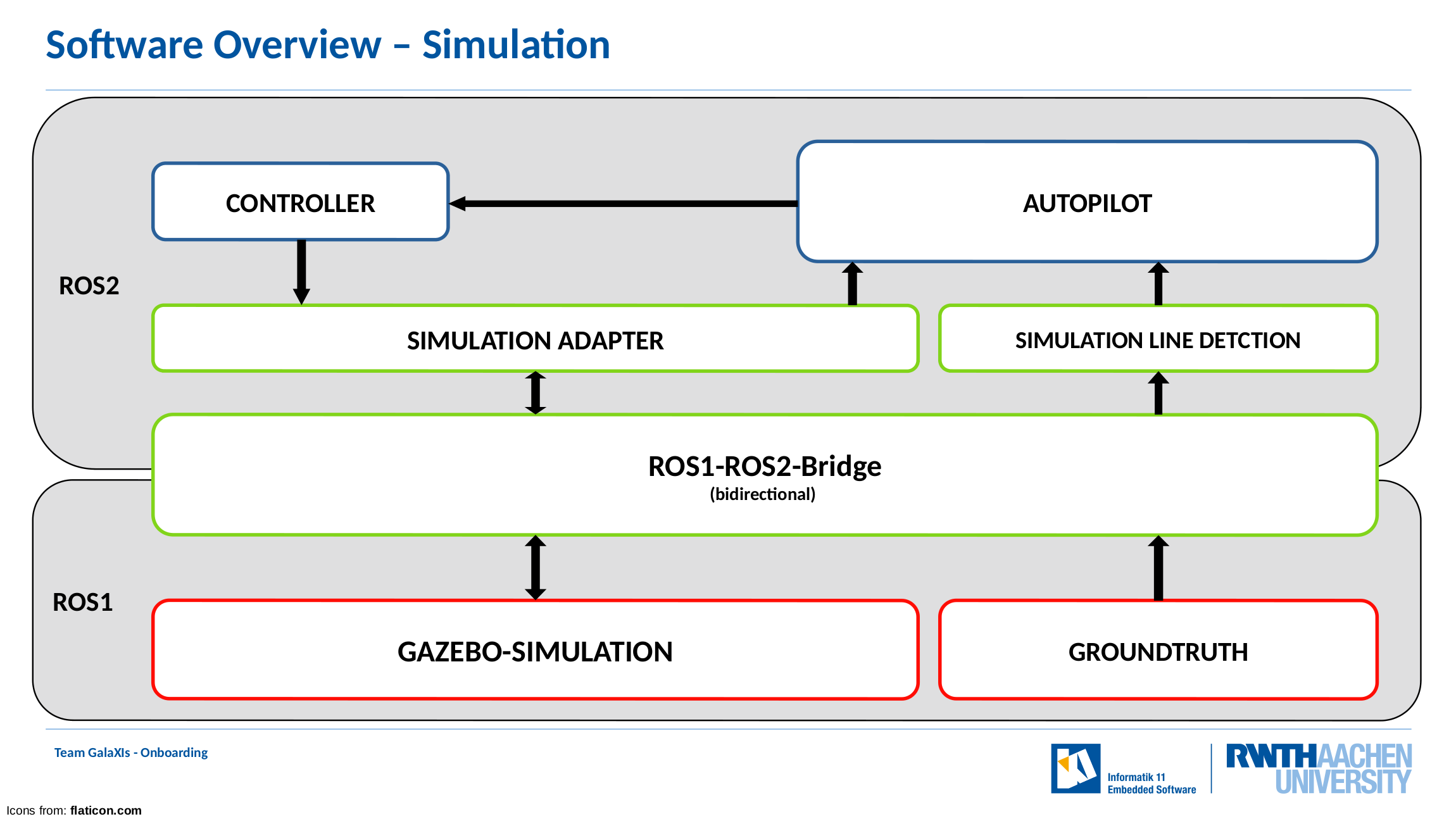
For this onboarding, we use a simulation. For simplicity, the obstacle and road sign detection unit is removed. Furthermore, the line detection unit is replaced by using the simulations groundtruth. An overview is shown here:
Have fun with the challenges!
HINTS:
- The nodes SimulationAdapter, SimulationLineDetection, OnboardingController and Autopilot must be started within the Development Runtime Environment (i.e.
./run_exe.sh SimulationAdapter) - Start the nodes within a tmux
Software Architecture
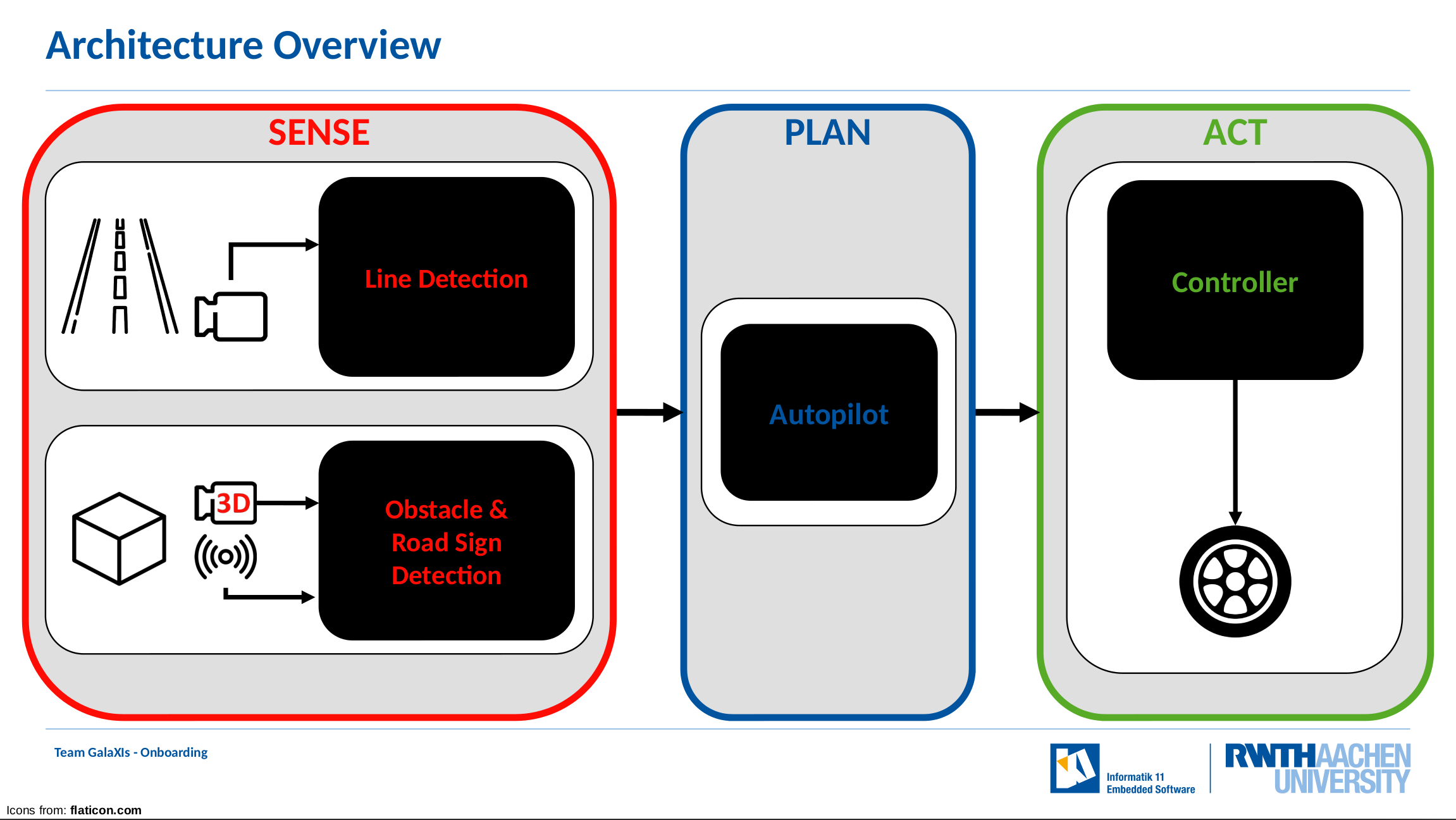
The software is build upon the Sense-Plan-Act paradigm.
- Sense: In this stage, the environment of the vehicle is recognized by two units (nodes): the Line Detection Unit retrieves the stream of the video camera and detects the lane borders by using an neuronal network. The other unit, the Obstacle & Road Sign Detection, uses a 3D camera as well as time of flight sensors for the recognition.
- Plan: The plan stage and therefore the Autopilot Unit is responsible to construct a trajectory, the vehicle must follow. To do so, it receives the environment information by the two units of the sense stage.
- Act: In the last stage, the act stage, the Controller Unit translates the given trajectory into corresponding steering angles and communicates with the electric control unit of the vehicle.
Folderstructure
.
├── docs      # Documentations
├── messages  # GalaXIs ROS2 custom messages
├── nodes     # GalaXIs ROS2 nodes (Autopilot, Controller Node, ...)
├── scripts   # Useful scripts (start development environment, clang format, ...)
├── simulation_adapter_messages # ROS2 custom messages for simulation integration
├── settings  # Configuration Files for GalaXIs ROS2 nodes
├── utilities # GalaXIs Library supporting the nodes
├── compile.sh # Script to compile all GalaXIs nodes
├── clean.sh  # Script to clean all build files
└── README.md # This README
Setup
Setup Development Runtime Environment (GalaXIs docker)
-
We recommend to use Ubuntu or Manjaro as Operating System
-
Install Docker: https://docs.docker.com/get-docker/
-
Clone this repository:
$ git clone git@git.rwth-aachen.de:team_galaxis/onboarding.git -
(Download and) Start the docker environment as shown here:
$ ./scripts/start_docker.sh --helpUsing the
updateflag, the newest container is downloaded if it is not already existing on your computer.For Mac and Windows: Make sure the docker container has enough resources. These can be changed in the Docker Desktop App.
-
Inside the docker container, run
./compile.shto compile all GalaXIs nodes (you may need to run it multiple times for it to succeed) -
You can start nodes using
./run_exe.sh
Setup Development Coding Environment
- Install
Visual Studio Code:- Ubuntu/Debian (recommended)
- Go to code.visualstudio.com and download the
.debfile. - Install it via:
$ sudo dpkg -i <path-to-vscode.deb>(You may have to install additional packages via:$ sudo apt install --fix-missing)
- Go to code.visualstudio.com and download the
- Linux Systems:
# i.e. for Ubuntu/Manjaro$ sudo snap install --classic code
- Ubuntu/Debian (recommended)
Setup Simulation Environment (only Linux)
These steps currently require access to an Nvidia GPU and a nativ linux installation. This is due to the fact, that only Nvidia supports direct passthrough of the GPU to the container, which is necessary as the simulation requires OpenGL acceleration.
-
Prerequisites: NVIDIA Container Toolkit
-
Clone galaxis-simulation repository:
$ git clone git@git.rwth-aachen.de:team_galaxis/galaxis-simulation.git -
Build Simulation and Bridge (See README.md of galaxis-simulation repo):
$ cd galaxis-simulation# build simulation$ cd simulation$ ./build_container.sh# build bridge (for integration into GalaXIs software)$ cd bridge$ ./build_container.sh -
Start Simulation
$ cd simulation$ ./start_container.sh$$ ./start_simulation.sh --help -
Start Bridge
$ cd bridge$ ./start_container.sh$$ ./start_bridge.sh
How to get Started
Compile the example Nodes in our Development Runtime Environment (GalaXIs docker)
Compile the nodes:
   $ ls
   build  clean.sh  compile.sh  docs  install  log  messages  nodes  README.md  run_exe.sh  scripts  settings  simulation_adapter_messages  utilities
   $ ./compile.sh
   $ source ./install/setup.bash
This compiles the nodes in the onboarding. Sourcing sets the environment variables, so that the bash ./run_exe.sh script can find them.
Test that everything works
While having the Simulation and Bridge running, you can now start the Simulation Adapter and the RemoteControl CommandLine Programms. These should allow you to move the Car in the Simulation.
Information about tmux: A Quick and Easy Guide to tmux, tmux
Using tmux you can start these components from the Commandline that ./start_docker.sh gave you.
- Start SimulationAdapter inside GalaXIs docker in tmux
./run_exe.sh SimulationAdapter - Start RemoteControl inside GalaXIs docker in tmux
./run_exe.sh RemoteControland have fun! :)
Start working on the Task
Implement your own Controller, as described at the top of this README.md and finally test you code using the following nodes and in seperate tmux panes:
   $ ./run_exe.sh SimulationAdapter --gtnode
   $ ./run_exe.sh AutopilotNode
   $ ./run_exe.sh OnboardingControllerNode
   $ ./run_exe.sh SimulationLineDetection
If everything works as intended, then the car should now be controlled by your controller and drive through the simulation.