AutoFahrer
Doxygen Documentation:
Overview
To achieve good lap times, the car has a Model Predictive Controller. It is highly tuneable and improves the lane keeping performance compared to simpler approaches. The MPC adjusts the speed based on track conditions. To update the trajectory reference at a higher rate thus allowing for higher speeds, the environmental model decouples the trajectory update from our slower lane detection updates.
In Obstacle Driving, our car has to avoid a number of obstacles on track. To give you more insight into the perception and planning of our car, we show the debug output of our trajectory planning on the upper right and right below, the lane detection in action (see YouTube video). These outputs degrade the performance of the car and were consequently disabled in the former discipline to achieve maximum speed.
Finally, we minimized the communication overhead for large, time critical messages by using our own shared memory implementation instead of ROS2.
Map
Concept
The map is a 2D grid of cells. The origin of the map is the center of the car. The map is 2000x4000 cells large with each cell representing 1cm². Because the car is kept fixed at the origin, all detections move towards the bottom of the image with each localization update.
The image below shows a potential state of the map with the detected lanes from the Scenario Detection in blue/brown, a motorway traffic sign and an obstacle in red.
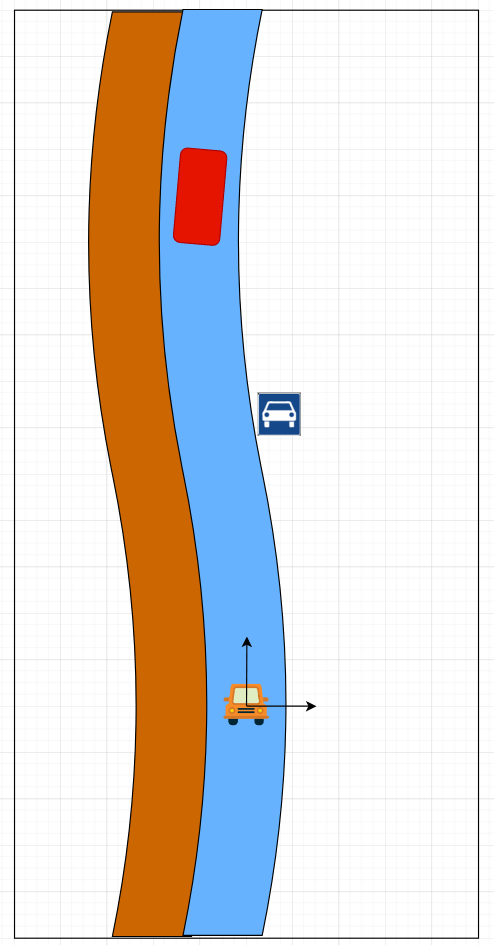
Instead of simply storing in each cell by which detection it is occupied, which would result in a lot of transformation computation with each localization update, we store provide each detection its own local coordinate system and canvas to draw upon. So instead of having to tranform each cell we only have to transform the origin of each detection.
The image below shows individual canvases of the detections in the map.
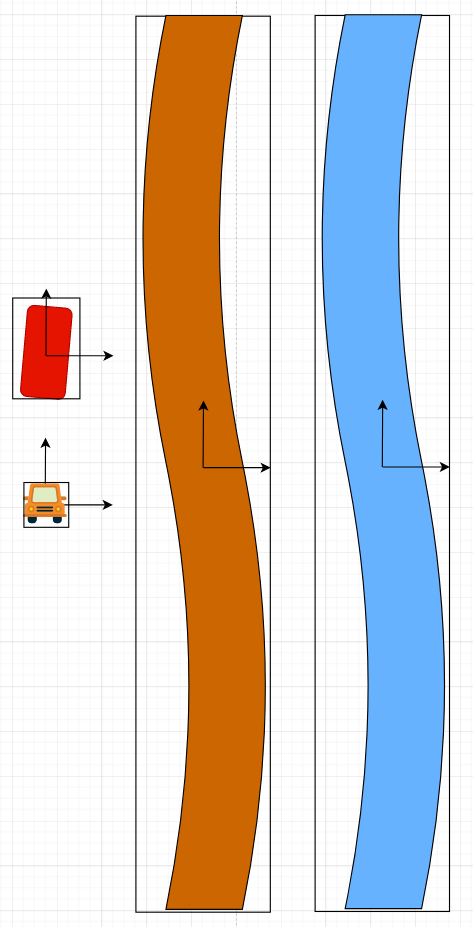
The map currently distinguishes between the following types of detections:
- MapObjects: for obstacle detections
- ZoneObjects: for scenario detections
- TrafficSignObjects: for traffic signs
Lists
- MapObject List
- ZoneObject List
Coordinate Transforms
Bounding Box to Map Coordinates
The message of a detected traffic signs contains the following fields:
- signString
- probability
- xMin, xMax
- yMin, yMax
- zMin, zMax
The image below shows the coordinate system of the bounding box with the origin lying on the camera.

In order to transform the bounding box to map coordinates, we first multiply the Coordinates by 100 to get the coordinates in cm. Then we need to multiply the y Coordinates with -1 to flip the y axis. Since our map is only 2D we can simply drop the z Coordinates.